November 7, 2026
A Hybrid AI Home Control System: Local Model First, Cloud as Backup
My voice assistant's brain is Gemma 4 running on a computer at home; when that computer goes down, Home Assistant switches itself over to Gemini. Everything from the Ollama install and Modelfile to the settings Home Assistant hides, the fallback automation and camera-driven curtain control — with all the code.
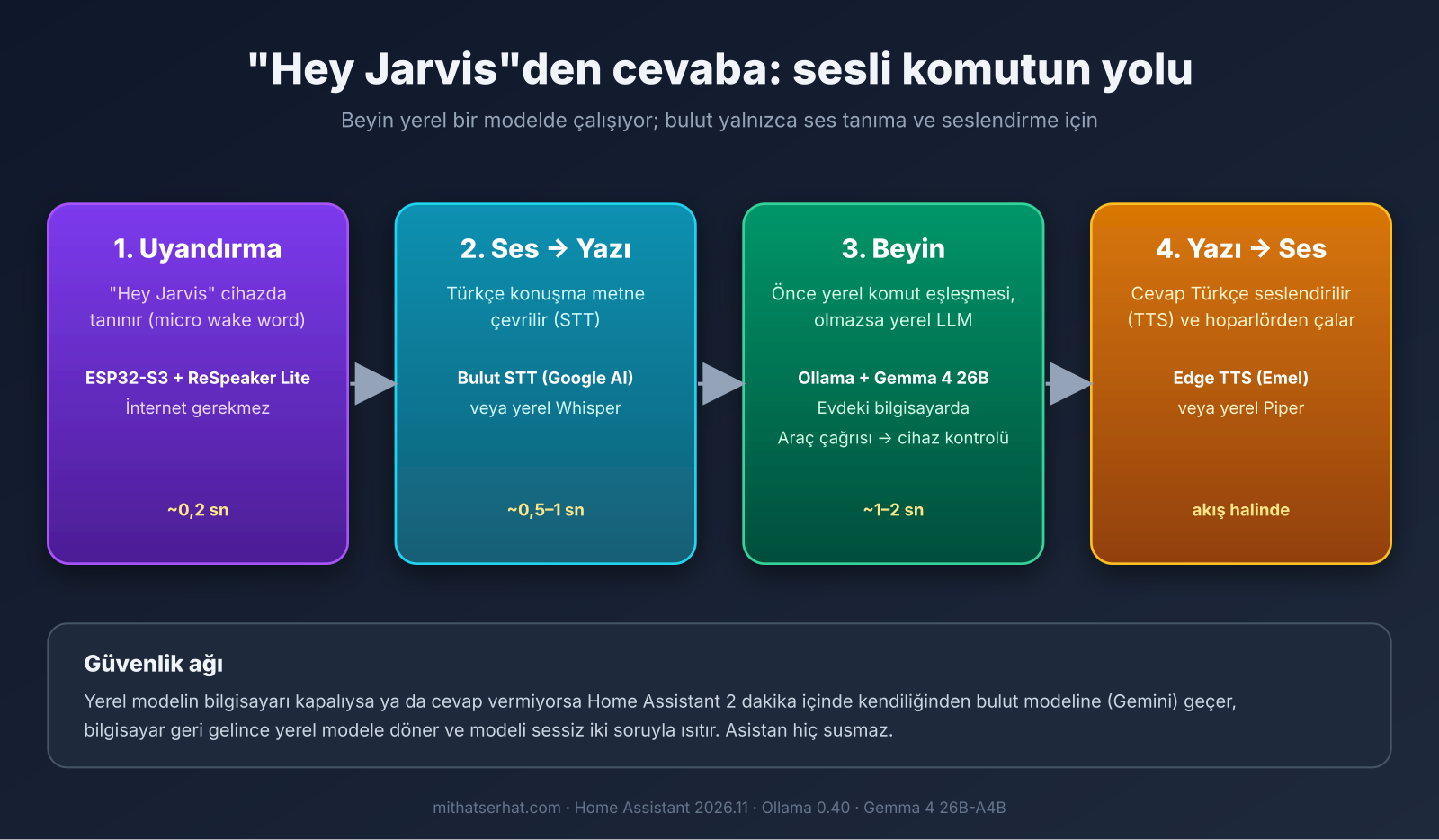
For a year the brain of my smart home's voice assistant was Gemini: when I said "Jarvis, turn on the back light", the audio went to the cloud and the answer came back from the cloud. It worked, but two things bothered me: every sentence spoken inside the house left the house, and when the internet dropped, the assistant went silent. This week I moved the brain home. A local model (Gemma 4) runs at the same speed with the same accuracy; the cloud is now only a backup.
Here is why I call it "hybrid": I did not go fully local. If the computer at home is off, asleep or the model has stalled, Home Assistant notices on its own and switches to Gemini, then switches back to local when the computer returns. The assistant never goes quiet, and I never have to think about which brain is running.
This post is for anyone who wants to walk the same road: the install, the settings Home Assistant does not show in its UI, the prompt, the fallback automation, and the two applications I built on top of this (camera-driven curtain control and free image analysis). All the code is copy-paste ready; just fill in the parts marked <...>.
Why hybrid?
Three wins: privacy (nothing said in the living room leaves the house), independence (lights still respond to voice when the internet is down) and cost (zero API bill). The price: a computer with at least 24 GB of memory that is on most of the time. I use an Apple Silicon machine I already had; a 32 GB mini PC or a desktop with a GPU would do the same job.
The "most of the time" part matters. The computer is off for a few hours a day. In a local-only setup the assistant would be dead during those hours. In the hybrid setup Gemini takes over; you do not even notice.
Which model?
My first attempt was Qwen 3.6 35B. It was fast but stumbled in Turkish: it read "27.8 degrees" as "seven point eight" and made up the date. Gemma 4 26B-A4B changed the picture: 26 billion parameters, but only 4 billion are active per token; the 18 GB model fits comfortably in 36 GB of memory and generates more than 80 tokens per second. I asked the same 15 questions side by side with Gemini (humidity, lights that are on, the date, an ambiguous command, garbled audio, a 3-turn riddle, exchange rates); both passed. Warmed up, Gemma answers in 0.7–2 seconds, Gemini in 1–2.
Setup: the computer side
1. Ollama. You need a current version; Gemma 4 fails to download on older Ollama builds with a 412 error. After installing:
ollama pull gemma4:26b # Apple Silicon'da MLX sürümü: gemma4:26b-mlx2. Modelfile. Home Assistant's Ollama integration does not send a temperature; Gemma's default is 1.0, and at that value there is a known bug where it appends "noise" to the end of a tool call and breaks it. The fix is to bake the settings into the model:
# Modelfile
FROM gemma4:26b
PARAMETER temperature 0.5
PARAMETER top_k 64
PARAMETER top_p 0.95ollama create gemma4-jarvis -f ModelfileIn Home Assistant you now pick gemma4-jarvis instead of gemma4:26b.
3. Ollama environment variables. None of these appear in any UI, yet they make the biggest difference:
| Variable | Value | Why |
|---|---|---|
OLLAMA_MAX_LOADED_MODELS | 1 | So a second model never loads and bloats memory |
OLLAMA_NUM_PARALLEL | 1 | Single user; parallel requests multiply the context |
OLLAMA_KEEP_ALIVE | -1 | Never evict the model from memory (cold start is 8–14 s) |
OLLAMA_HOST | 127.0.0.1 | Local only; we expose it over VPN instead |
On macOS launchctl setenv is not enough to make these persistent (they vanish when the session ends); you need a LaunchAgent:
<!-- ~/Library/LaunchAgents/ollama.env.plist -->
<?xml version="1.0" encoding="UTF-8"?>
<plist version="1.0"><dict>
  <key>Label</key><string>ollama.env</string>
  <key>ProgramArguments</key><array>
    <string>sh</string><string>-c</string>
    <string>launchctl setenv OLLAMA_MAX_LOADED_MODELS 1; launchctl setenv OLLAMA_NUM_PARALLEL 1; launchctl setenv OLLAMA_KEEP_ALIVE -1</string>
  </array>
  <key>RunAtLoad</key><true/>
</dict></plist>
On Linux the same variables go into [Service] Environment= lines via systemctl edit ollama.
4. Sleep off. A laptop with the lid closed goes to sleep and Ollama stops answering. sudo pmset -a disablesleep 1 (macOS) or systemctl mask sleep.target (Linux).
5. A safe path to Home Assistant: Tailscale. Ollama has no password; do not expose it even to the home LAN. I put the computer and the Raspberry Pi on Tailscale and expose Ollama only to the VPN network:
tailscale serve --bg --tcp 11434 tcp://localhost:11434In Home Assistant the Ollama address is http://<your-computer's-tailscale-ip>:11434. Whether the computer is at home or away, the address never changes; that is the secret behind the hybrid working "wherever the computer is".
Setup: the Home Assistant side
Ollama integration. Settings → Integrations → Ollama, with the address above. Then add a "Conversation agent" sub-entry and set the following. The ones in parentheses are not in the UI; they are set in the integration's storage file (.storage/core.config_entries) or via the config_entries/subentries/update websocket command:
model: gemma4-jarvis:latest
llm_hass_api: [assist]          # Ev kontrolü araçları açık
max_history: 10                 # Konuşma geçmişi (mesaj)
num_ctx: 16384                  # Bağlam penceresi — varsayılan 8192 yetmiyor
keep_alive: -1                  # (gizli) Akşam hattında model hep bellekte
think: false                    # (gizli) Düşünme modu kapalı — her komuta 5-7 sn ekliyor
Why 16K context? With more than 40 devices exposed, the system prompt + tool definitions + device list + conversation history overflow 8K and the model becomes "unreliable". 16K is comfortable; the memory cost is 4–6 GB. I expose 46 devices; the official recommendation is under 25. Expose only what you actually use by voice and give them Turkish aliases ("front lamp", "counter light").
Two agents, two pipelines. I defined two conversation agents on the same model: "Local Day" (keep_alive: 1800, evicted after 30 minutes since the computer also does other work) and "Local Evening" (keep_alive: -1, always in memory from 18:00 until morning and on weekends). Each has its own voice assistant pipeline; an automation picks the pipeline by time of day.
Prefer handling commands locally: on. Clear commands like "turn on the back light" run in 0.1 seconds without ever reaching the LLM. The LLM only steps in when there is no local match.
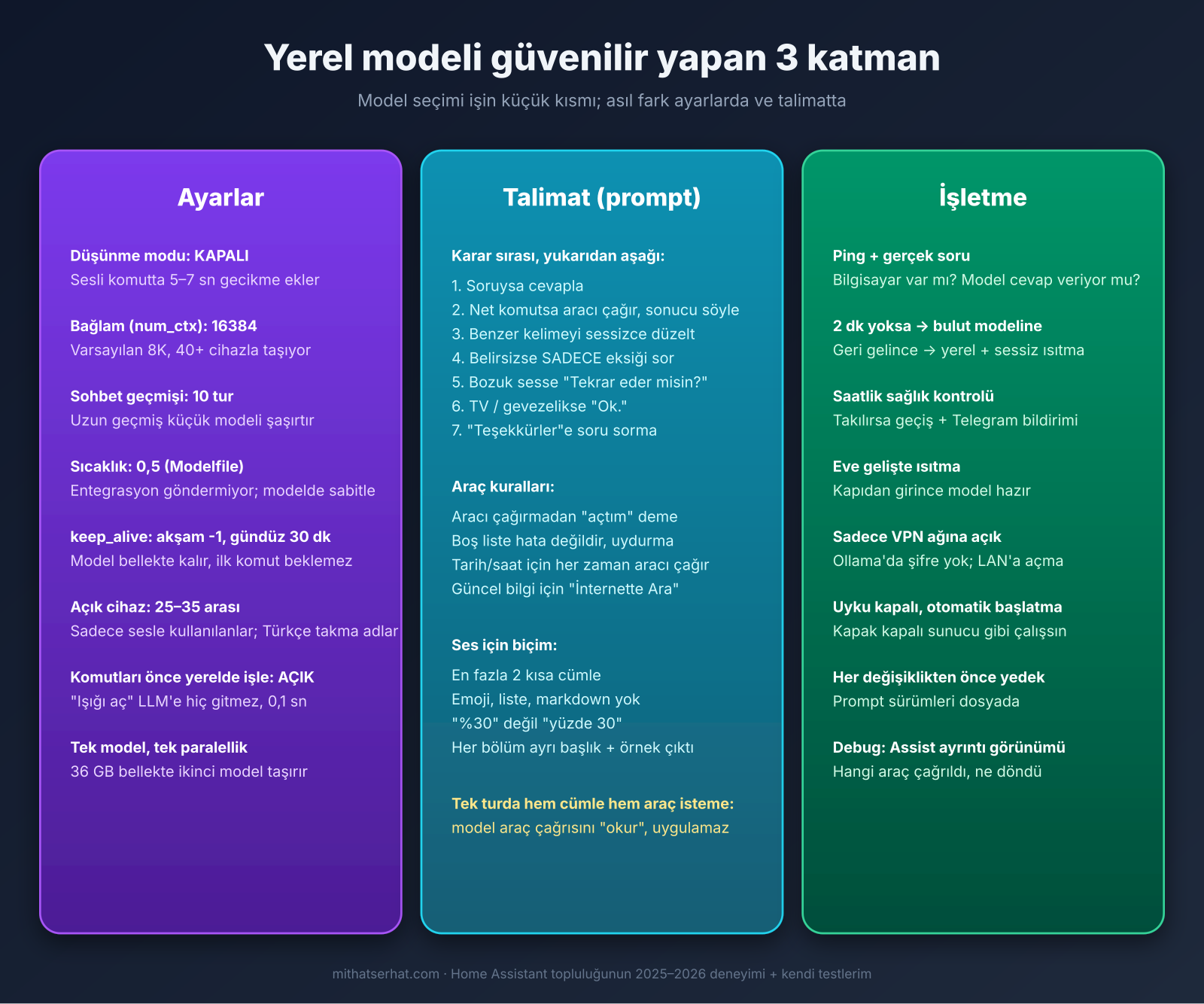
The prompt: this is where the model gets its character
If the system prompt stays at the level of "you are an assistant, keep answers short", the model invents the weather, turns off a random light when you say "turn off the light", and replies to the TV. Here is the prompt I use (it works identically on Gemma and Gemini; change the names to suit you):
Sen Jarvis'sin: ailemizin evindeki Türkçe akıllı ev asistanı. Evde anne, baba ve iki çocuk yaşıyor. Mikrofon salonda.

# Dil ve biçim
- Her zaman Türkçe cevap ver.
- Cevaplar sesli okunacak: en fazla 2 kısa cümle. Emoji, liste, madde işareti ve markdown kullanma.
- Sayıları rakamla yaz (27,8 derece; saat 14:30). Birim sembolü kullanma: "%30" yerine "yüzde 30", "°C" yerine "derece".

# Karar sırası (her mesajda yukarıdan aşağı uygula)
1. Soru: cevapla. Sohbette samimi ve doğal ol; çocuklara yaşlarına uygun, sabırlı ve basit anlat. Sadece sohbet sürüyorsa cevabı tek kısa soruyla bitir.
2. Net komut: ilgili aracı HEMEN çağır, sonra sadece sonucu söyle ("Arka ışığı açtım."). Aracı çağırmadan asla "açtım", "kapattım" ya da "yaptım" deme. Araç hata dönerse hatayı kısaca söyle. Komuttan sonra soru sorma.
3. Ses benzerliği: bir kelime bilinen bir cihaz adına çok benziyorsa ("arkı ışık" → arka ışık) düzeltilmiş haliyle aracı çağır ve sonucu söyle; açıklama ekleme. İki farklı cihaz arasında kalırsan uygulama, sor.
4. EN ÖNEMLİ KURAL: Cihaz adı yoksa, yarım kalmışsa ya da birden fazla cihaza uyuyorsa HİÇBİR aracı çağırma. 2-5 kelimeyle sadece eksik olanı sor ("Hangi ışığı kapatayım?"); seçenek sayma, oda tahmin etme. Yanlış cihaza dokunmak sormaktan çok daha kötüdür.
5. 1-10 kelimelik bozuk, yarım veya anlamsız bir sesse sadece "Tekrar eder misin?" de.
6. Uzun gevezelik, TV sesi veya sana söylenmemiş bir konuşmaysa hiçbir şey yapma, sadece "Ok." de.
7. "Hayır", "tamam", "bu kadar", "teşekkürler" gibi kapanışlarda kısa cevap ver ("Tamam.") ve soru sorma.

# Ev durumu
- Bir araç boş liste ya da "bulunamadı" dönerse bu hata değildir: "Açık ışık yok" de, bilgi uydurma.
- Cihaz, sıcaklık, nem veya "ne açık" sorularında tahmin etme; araçtaki güncel değeri kullan ve sadece sorulanı söyle.

# Tarih ve saat
- Tarih, gün veya saat sorulursa ASLA tahmin etme; önce GetDateTime aracını çağır ve sonucunu söyle.

# Hava
- Biçim örneği: "Dışarısı 10 derece, parçalı bulutlu." Yorum ekleme.

# Güncel bilgi
- Haber, maç skoru, döviz, fiyat veya başka şehrin havası sorulursa tahmin etme: "İnternette Ara" aracını çağır ve dönen cevabı kısaca söyle.
Three of these rules took me a day each to learn:
- "Never say 'done' without calling the tool." Without this line the model sometimes says "turned it on" without turning anything on.
- "If asked the date, call GetDateTime." Without it, Gemma made up a date in May 2024; with the rule it said "Friday, 6 November 2026".
- Gemma 4 over Ollama cannot both speak a sentence and call a tool in the same turn. When I wrote "say 'I assume you mean X' and then do it" in the prompt, the model read the tool call out loud as text and the light stayed off. "Correct silently, act, then report the result" fixed it.
Why "Ok." for silence instead of "."? An empty or single-dot reply locks up Edge TTS for 8 seconds; "Ok." is harmless.
The "Search the Internet" tool is a script of my own too: it forwards the question to a second Gemini agent that only has Google Search enabled and returns the answer. The local model cannot reach the internet, but thanks to this tool it still answers "how much is the dollar"; only that one question goes to the cloud, everything else stays home.
The fallback automation: the assistant never goes quiet
This is the heart of the hybrid. Three parts:
1. Ping sensor. Settings → Integrations → Ping, target is the computer's Tailscale address. Call it binary_sensor.yerel_llm_makinesi.
2. The automation that switches pipelines. The satellite's (Jarvis's) assistant selection is a select entity; the automation changes it. Full YAML:
alias: Jarvis - Beyin Yedeği
description: Bilgisayar yoksa Gemini; varsa saate göre yerel hat. Geçişte modeli sessizce ısıt.
mode: restart
triggers:
  - trigger: state
    entity_id: binary_sensor.yerel_llm_makinesi
    to: [off, unavailable]
    for: {minutes: 2}
    id: yok
  - trigger: state
    entity_id: binary_sensor.yerel_llm_makinesi
    to: "on"
    for: {minutes: 1}
    id: var
  - trigger: homeassistant
    event: start
  - trigger: time
    at: ["08:00:00", "18:00:00"]
  - trigger: time_pattern
    minutes: "17"
    id: saglik
  - trigger: state
    entity_id: [person.anne, person.baba]
    to: home
    id: eve_gelis
variables:
  aksam: "{{ now().weekday() >= 5 or now().hour >= 18 or now().hour < 8 }}"
  hat: "{{ 'Yerel Akşam' if aksam else 'Yerel Gündüz' }}"
  ajan: "{{ 'conversation.yerel_gemma_aksam' if aksam else 'conversation.yerel_gemma' }}"
  yerelde: "{{ is_state('select.jarvis_salon_asistan', ['Yerel Gündüz', 'Yerel Akşam']) }}"
actions:
  - choose:
      # Saatlik sağlık kontrolü: ping var ama model cevap vermiyorsa Gemini'ye geç
      - conditions:
          - condition: trigger
            id: saglik
          - "{{ yerelde and is_state('binary_sensor.yerel_llm_makinesi', 'on') }}"
        sequence:
          - action: conversation.process
            data: {agent_id: "{{ ajan }}", language: tr, text: "Dışarısı kaç derece?"}
            response_variable: cevap
            continue_on_error: true
          - if: "{{ cevap is not defined or cevap.response.speech.plain.speech | default('') | length < 3 }}"
            then:
              - action: select.select_option
                target: {entity_id: select.jarvis_salon_asistan}
                data: {option: preferred}      # "preferred" = HA'nın tercih edilen hattı = Gemini
              - action: notify.telegram
                data: {message: "Yerel model cevap vermedi, Jarvis Gemini'ye alındı."}
          - stop: Sağlık kontrolü bitti
      # Eve gelince: sadece ısıt (hat zaten yerelse)
      - conditions:
          - condition: trigger
            id: eve_gelis
        sequence:
          - if: "{{ yerelde and is_state('binary_sensor.yerel_llm_makinesi', 'on') }}"
            then:
              - action: conversation.process
                data: {agent_id: "{{ ajan }}", language: tr, text: "Salonun sıcaklığı kaç?"}
                continue_on_error: true
          - stop: Isıtma bitti
  # Diğer tetikleyiciler: 30 sn bekle (HA açılışında entegrasyonlar otursun), sonra karar ver
  - delay: {seconds: 30}
  - if: "{{ is_state('binary_sensor.yerel_llm_makinesi', 'on') }}"
    then:
      - action: conversation.process         # Önce ısıt: ilk soru modeli belleğe yükler
        data: {agent_id: "{{ ajan }}", language: tr, text: "Salonun sıcaklığı kaç?"}
        response_variable: cevap
        continue_on_error: true
      - if: "{{ cevap is defined and cevap.response.speech.plain.speech | default('') | length >= 3 }}"
        then:
          - action: select.select_option
            target: {entity_id: select.jarvis_salon_asistan}
            data: {option: "{{ hat }}"}
        else:
          - action: select.select_option
            target: {entity_id: select.jarvis_salon_asistan}
            data: {option: preferred}
    else:
      - action: select.select_option
        target: {entity_id: select.jarvis_salon_asistan}
        data: {option: preferred}
Why it is built this way:
- Switch after the ping is gone for 2 minutes, switch back 1 minute after it returns. Short Wi-Fi drops do not make the pipeline flap back and forth.
- A real question once an hour, not once a minute. Ping says the computer is up, not that the model is working. This rule earned its keep on day one: while I was changing settings back to back, Ollama locked up and memory ballooned to 27 GB; ping answered, the model did not. But asking every minute would tire the computer for nothing; hourly is enough.
- Warm up first, switch second. When the model is not in memory the first answer takes 8–14 seconds; the automation pays that cost itself, you never do. When you come home it quietly asks a question too; by the time you walk in and say "Jarvis", the model is already ready.
- The "preferred" option is Home Assistant's "preferred assistant"; make the Gemini pipeline the preferred one and it automatically becomes the fallback.
3. Let me know. One line to Telegram (or the phone). Knowing which brain is running answers the "why did it reply differently today" question.
On the same infrastructure: camera-driven curtains, free image analysis
After setting up the local model I realised something else: asking the cloud about every image at home is unnecessary too. Three examples.
Curtains. The motorised curtains in the living room run on an infrared remote (I trigger them from HA with a Broadlink RM Pro). The problem: the remote only has OPEN and CLOSE, and sending CLOSE again while the curtain is already closed strains the motor. HA's memory is not reliable either (someone may have closed it by hand). The solution: look at the camera before sending the command.
An old laptop at home (Ubuntu + Docker) already runs Frigate. On top of it I put an 80-line Python service: it grabs Frigate's latest frame, crops the curtain region, and compares brightness/edge/colour statistics against samples I labelled earlier (nearest neighbour). No model, no GPU, no cloud request; the answer takes 100 ms.
# analiz.py — özet
@app.get("/perde")
def perde(donem: str):               # gunduz | gece | alaca
    kare = frigate_son_kare()        # http://127.0.0.1:5000/api/salon/latest.jpg
    sonuc = {}
    for ad, kutu in BOLGELER.items():                 # buyuk: (x0,y0,x1,y1), kucuk: ...
        oz = ozellik(kare.crop(kutu))                 # ort. parlaklık, std, kenar oranı, mavi-kırmızı
        durum, guven = en_yakin_komsu(oz, ORNEKLER[donem][ad])
        sonuc[ad] = durum if guven >= 0.40 else "belirsiz"
    return sonuc

@app.get("/ogren")                   # Telegram cevabı gelince o kareyi örnek olarak kaydet
def ogren(perde: str, durum: str, donem: str): ...
On the HA side the curtain script decides like this:
# script.perde_hareket (özet)
sequence:
  - if: "{{ is_state('input_boolean.' ~ perde ~ '_acik', 'on') == (hedef == 'ac') and not zorla }}"
    then: {stop: Zaten hedefte, komut yok}
  - action: rest_command.kamera_perde_durum     # sunucuya sor
    response_variable: kamera
  - choose:
      - conditions: "{{ kamera.content[perde] == ('acik' if hedef == 'kapat' else 'kapali') }}"
        sequence:
          - action: remote.send_command          # Broadlink: 5-6 sn basılı tut = tam açılış/kapanış
            target: {entity_id: remote.broadlink}
            data: {device: perde, command: "{{ hedef }}", num_repeats: 8}
          - action: input_boolean.turn_{{ 'on' if hedef == 'ac' else 'off' }}
            target: {entity_id: "input_boolean.{{ perde }}_acik"}
    default:                                     # belirsiz ya da hafızayla çelişiyor → sor
      - action: telegram_bot.send_photo
        data:
          file: /config/www/perde_son.jpg
          caption: "{{ perde }} perdesi: kamera emin değil. Ne yapayım?"
          inline_keyboard: ["Kapat:/perde_kapat_{{ perde }}, Aç:/perde_ac_{{ perde }}, Bir şey yapma:/perde_yok"]
If I answer "Close" from Telegram, the command is sent and that frame is also taught to the server as a "closed" sample (/ogren). In the first week it asked 2–3 times a day; now it never asks. When you tell Jarvis "close the curtains" the same script runs; if it is unsure it says "I'm not sure about the curtain, I've asked".
Is the projector on? HA only sees the projector through Chromecast; while watching a match over HDMI it thought the projector was "off" and pushed the announcement video onto the screen. I added /epson to the same service: if edge density in the screen region is above 12%, the screen is on. A REST sensor in HA reads it every 30 seconds; the "being watched" condition now checks this too.
rest:
  - resource: http://<sunucu>:8099/epson
    scan_interval: 30
    sensor:
      - name: salon_epson_kenar
        value_template: "{{ value_json.kenar }}"
template:
  - binary_sensor:
      - name: epson_ekrani_kamera
        state: "{{ states('sensor.salon_epson_kenar') | float(0) > 12 }}"
        delay_on: {minutes: 1}
        delay_off: {minutes: 3}
Sending fewer images to Gemini. Questions like "is anyone in the living room" or "who came home" still go to Gemini (the free tier allows 500 requests a day). But since half of these jobs are now handled by the simple analysis on the home server, the quota never fills up. The rule: jobs that need speed and language go to the local LLM, simple image questions go to the home server, everything else goes to the cloud.
Known pitfalls
- Memory bloat. If you reload Ollama back to back while changing settings, it climbs to 27 GB and locks up. Fix:
pkill -9 -i -f ollama; open -a Ollama. Because the health automation switched to Gemini in the meantime, nobody at home noticed. - Thinking mode. Gemma picks tools more accurately when it thinks, but it adds 5–7 seconds. Off for the voice assistant; you can turn it on for text chat.
- Device count. With 46 devices 16K context is enough; above 80 you need 32K, and memory grows by another 8–10 GB.
- Do not expose Ollama to the network. Tailscale (or WireGuard) is a must;
tailscale serveis a single line, and use ACLs to allow only HA. - The satellite goes quiet for 1–2 seconds when the pipeline changes. Since the automation handles the switches, in practice nobody notices.
Conclusion
A local model, with a good model and the right settings, is indistinguishable from the cloud; with bad settings it stays at "works sometimes". With a hybrid setup you get both: privacy and speed most of the day, continuity all the time. Where I am today: 0.7–2 second answers when warm, zero API cost, conversations that never leave the house, an assistant that does not go quiet even when the computer is off, and curtains that look at the camera before they decide.
The hardware side, the box that actually says "Hey Jarvis", is in the next post: Build Your Own Home Mini and Make It Speak Turkish. For questions, reach me through the Contact page.
Sources: Home Assistant Community — "My Journey to a reliable and enjoyable locally hosted voice assistant", "So You Want to AI in Home Assistant"; Home Assistant Ollama and Ping integration docs; Ollama FAQ (environment variables); Ollama GitHub issues (#15539, #17562, #18649); Frigate documentation.
Comments
Loading comments…